

Postback Conversion Tracking
With Postback Conversion Tracking, you can get additional conversion reporting without relying on browser cookies. This lets you track conversions even when you can't place a conversion pixel on an advertiser's site or when the conversion happens outside of a browser. The conversion can be an entirely offline event, such as a visit to a physical store or something that occurs during a phone call.
With postback conversion tracking, a third-party tracking platform handles attribution. The third-party platform decides which impression or click receives conversion credit and notifies the DSP. Examples include:
An affiliate network tracking platform like HasOffers
A mobile measurement partner (MMP) like AppsFlyer
A footfall attribution vendor like Cuebiq
Setup
Most major tracking platforms a have simplified set-up for known ad platforms and DSPs.
To use postbacks, our DSP(s) and your tracking platform are configured to send the right information to each other by doing the following:
The Subset team configures the ad in our system with the click or impression tracking URL from the tracking platform, and insert our {auctionId} macro in the appropriate place to send our auction ID as the postback token. Subset uses its "auction ID" as the postback token.
The terminology for this varies; instead of "postback token", you might see this called "click ID", "postback ID", or another similar term.
The client configures its tracking platform with the URL to send postbacks to, using either the universal pixel endpoint or the "postback URL" option for a conversion pixel. Insert the third-party tracking platform's macro in the appropriate place to cause it to send the previously collected postback token back to Subset’s systems when a conversion takes place.
How It Works
The third-party tracking platform uses click or impression tracking URLs to collect information about clicks and impressions. Because the {auctionId} macro is included in these URLs as a postback token, the third-party platform records it for each click and impression.
After a conversion occurs, the third-party platform decides which click or impression should receive credit for it. It then looks up the previously stored postback token, and returns it to Subset by making a request—typically server-to-server—to the URL it has been configured to send postbacks to.
For example, let's say you want to track app installations as a conversion. Since app installs don't happen in a web browser, you can't use the usual client-side universal pixel or conversion pixel. Instead, you need an Mobile Measurement Partner (MMP) that can determine when the conversion takes place, attribute the conversion to a click, and then report the conversion to our DSP using a postback. For this example, let's assume that the selected MMP does not have a templated workflow and that you have to configure it manually.
Before the campaign runs:
The app developer chooses an MMP and integrates its SDK into the application's codebase. They configure it so that it makes a request to the MMP on the first open after install or on any other events they want to track.
The Subset team creates a universal pixel or a conversion and collects the universal pixel endpoint URL or conversion pixel URL used for receiving the postbacks. For new deployments, we suggest using the universal pixel endpoint as it offers more capabilities and flexibility. For example, the URL might look like
https://pixel.sitescout.com/up/1234?cntr_postbackAuctionId=[POSTBACK_GOES_HERE].
The postback is configured in the client’s MMP. The previously mentioned URL is configured as the postback destination, replacing the [POSTBACK_GOES_HERE] placeholder with the correct macro to return the token according to the MMP's documentation. For this example, we'll assume that the MMP uses the %%PUB_CLICK_ID%% as its macro to produce this.
Also in the MMP, a click or impression tracking URL is created and given to the DSP user. This URL may have placeholders in it, like
https://mobiletrackingvendor.com/click?campaign=123&ad=456&pub_click_id=[PUT_PUBLISHER_CLICK_ID_HERE]&idfa=[IDFA_HERE].
It may be necessary to consult the platform's documentation to determine how the postback token and any other needed data is passed.
The Subset team uses the click or impression tracking URLs for the ad, setting the click tracking URL from the MMP as the destination URL for the ads, and configuring the impression tracking URL (if provided) as an impression tracker for the ad. The user populates DSP macros in the appropriate places in the URL to send the postback token and any other data required by the tracking vendor.
For example, for mobile app measurement, it's expected that the mobile advertising ID (IDFA, GAID) is passed. The user would set this as the ad's destination URL:
https://mobiletrackingvendor.com/click?campaign=123&ad=456&pub_click_id={auctionId}&idfa={ifa}
The Subset team configures the campaign to track the conversions. The user performs the usual campaign creation and configuration and creates universal pixel rules as applicable.
Be sure to track conversions on the conversion event that you created earlier. The only special consideration may be that some platforms require the presence of a mobile advertising identifier (IFA) to successfully attribute a conversion. If that is the case, in the devices section of the campaign editor, target only phone and tablet and select Only target mobile app impressions that contain an IFA.
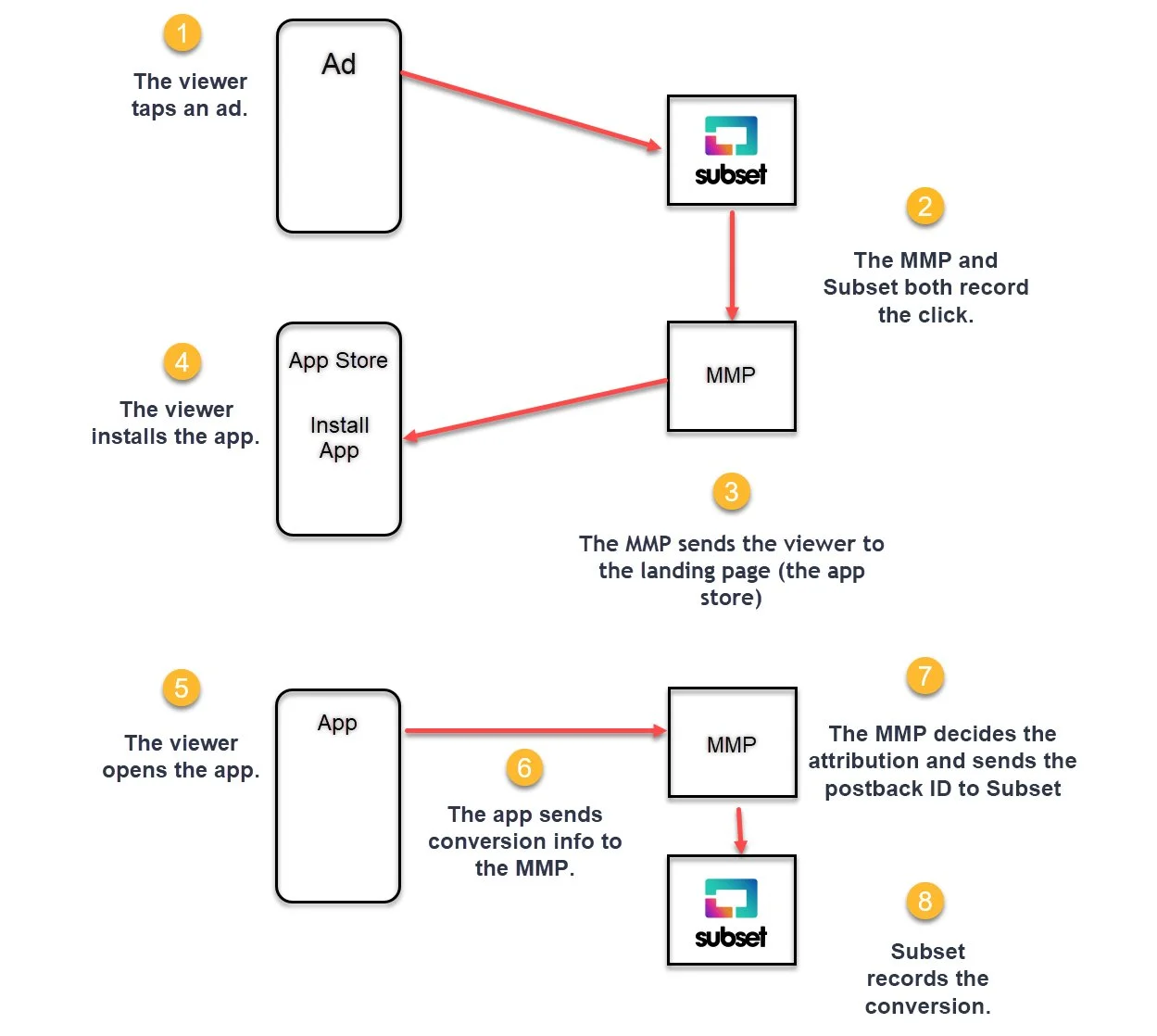
When the campaign goes live, here's what happens:
Make it stand out
The "postback" happens in step 7, when the tracking vendor sends the postback ID to Subset.
Additional Resources for Setup
Setup is simplified across many tracking vendors because as provide templates for easy implementation.
If a tracking vendor doesn't offer a template, you can request one by contacting us and introducing us to the right person at the vendor—most vendors are happy to do this.
Pre-configured templates are available for these tracking vendors:
Mobile Measurement Partners (MMPs)
Tune Attribution Analytics (formerly MobileAppTracking by Tune)
Kochava
AppsFlyer
Adjust
Flurry
Apsalar
Lithient
Footfall Attribution Vendors
Cuebiq
NinthDecimal
Placed
For historical reasons, one of our DSP partners Basis may be labeled "Centro" or "SiteScout" in the tracking vendor's UI. The Centro or SiteScout options should work fine.
Postback Tracking with Dynamic Values
You can also track dynamic revenue when using postback conversion attribution. If using one of the simplified templated workflows in the above platforms, this may be handled automatically.
If you handle this manually, use the examples below. The insertions for dynamic revenue tracking are highlighted in red. Replace the [INSERT_REVENUE_HERE] placeholder with the tracking platform's macro to output the revenue amount.
Universal Pixel endpoint:
https://pixel.sitescout.com/up/1234?cntr_postbackAuctionId=[POSTBACK_GOES_HERE]&cntr_revenue [INSERT_REVENUE_HERE]
Conversion pixel postback URL:
https://clickserv.pixel.ad/conv/1234/[INSERT_REVENUE_HERE]?pb=POSTBACK_GOES_HERE